The problem
InstallRoot got you on DoD sites.
It also stopped moving.
Accessing DoD websites — OWA, myPay, MilConnect — from a personal computer requires the DoD PKI root and intermediate CAs in your machine's trust store. DISA's InstallRoot does this, but it is Windows-only, closed source, and frozen at v5.6 (2024). Installing government root CAs is the highest-trust operation you can perform on a personal machine. You should be able to read the code that does it.
| DISA InstallRoot 5.6 | Fossroot | |
|---|---|---|
| Platforms | ✕ Windows only | ✓ Windows, macOS, Linux |
| Source code | ✕ Closed | ✓ 100% open — MIT / Apache-2.0 |
| Maintenance | ✕ Frozen at v5.6 (2024) | ✓ Actively developed |
| Footprint | Windows installer | ✓ Single portable exe — no installer, no services, no telemetry, no config files |
| Auditability | ✕ Closed source — you can't inspect what it does to your trust store | ✓ Every line that touches your trust store is public, in memory-safe Rust |
| Verification | Opaque | ✓ DISA's CMS-signed manifest + every certificate chain verified against pinned DoD roots — fail-closed |
| Uninstall | — | ✓ Removes exactly the certificates the bundle manages, nothing else — delete the exe and it's gone |
Trust model
Don't trust it. Verify it.
You shouldn't blindly trust any third-party root-CA installer — including this one. So Fossroot is built to need as little trust as possible:
Never ships certificates
The bundle is always fetched live from DISA's own distribution point,
dl.dod.cyber.mil. The only cert material in the binary is four DoD
root CAs, embedded purely as verification anchors.
Verifies DISA's signature
The bundle's CMS-signed checksum manifest is verified back to DoD root CAs whose SHA-256 fingerprints are pinned in the source code — not in a config file someone can swap out.
Verifies every chain
Every certificate in the bundle must chain — with real RSA and ECDSA signature verification — to a pinned DoD root, or the whole bundle is rejected outright.
Fails closed, diffs first
One bad signature or checksum and nothing installs. When verification passes, you see the full diff — installed, missing, expired, stale — before anything changes.
// SHA-256 fingerprints — every verification path ends here
DoD Root CA 3  b107b33f453e5510f68e513110c6f6944bacc263df0137f821c1b3c2f8f863d2
DoD Root CA 4  559a5189452b13f8233f0022363c06f26e3c517c1d4b77445035959df3244f74
DoD Root CA 5  1f4ede9dc2a241f6521bf518424acd49ebe84420e69daf5bac57af1f8ee294a9
DoD Root CA 6  2a5e41aca93df7cc496d2369b7a0a037045d502f1abaaf76975fc07c6660cf93
DISA signs every bundle group's manifest with a DoD PKE credential, so these four anchors transitively verify the DoD, ECA, JITC, and WCF bundles. Each embedded anchor is checked against its pin at load.
See it
One binary. Both interfaces.
Run fossroot with no arguments and you get a native GUI (pure Rust — no
WebView). Pass arguments and it's a CLI for scripts and CI. The same verification engine
runs either way, and the diff you see is exactly what will change.
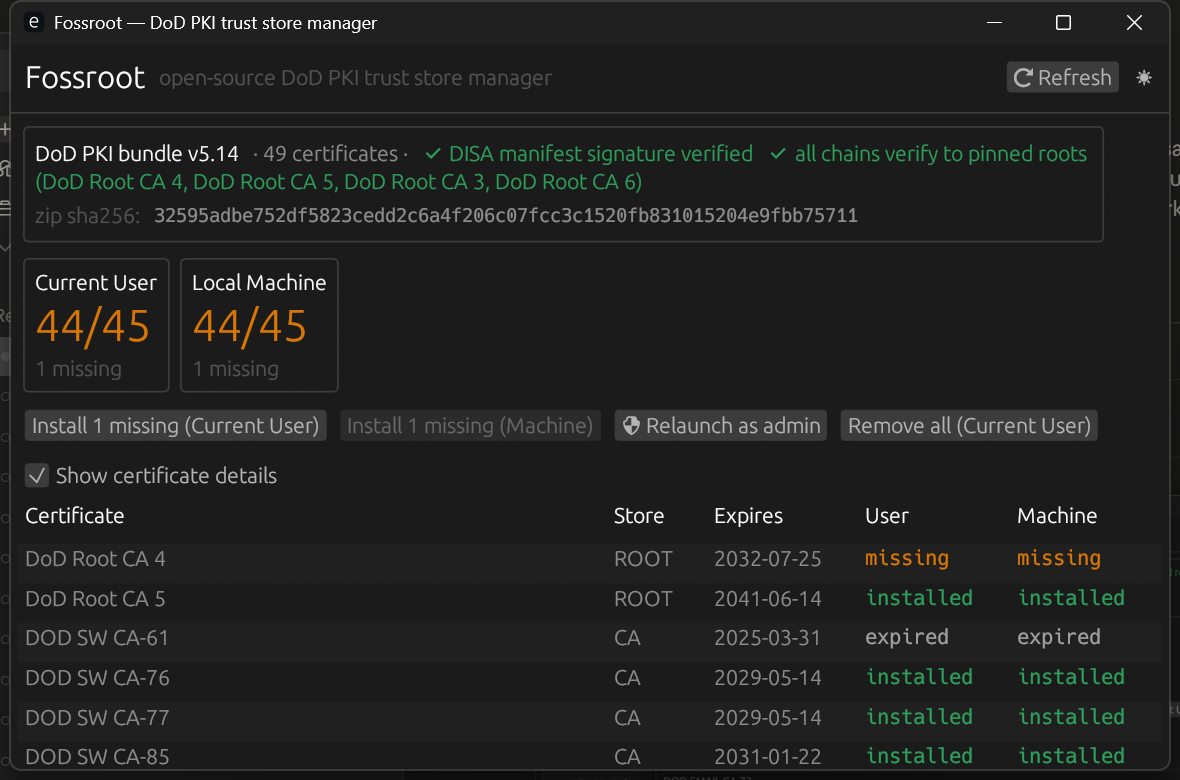
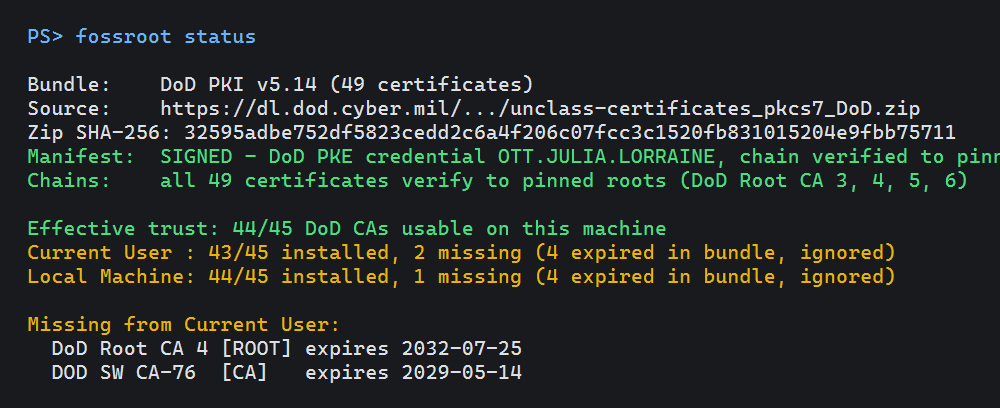
fossroot status is read-only and script-friendly (--json available) — drop it in a login script or a compliance check.Usage
Everything InstallRoot does, scriptable.
# GUI
fossroot

# read-only verification + coverage report
fossroot status
fossroot status --json

# install missing certs (current user, no admin)
fossroot install

# machine-wide + prune stale DoD CAs (elevated)
fossroot install --machine --prune

# uninstall everything the bundle manages
fossroot remove

# dump .cer files + PEM chain (Firefox, WSL, ...)
fossroot export --out d:

# air-gapped: use a hand-carried bundle
fossroot status --offline bundle.zip

# ECA / JITC / WCF bundle groups
fossroot --group eca status
No admin required
Installs to the per-user trust store by default — Windows shows its own confirmation for each root. Machine-wide needs an elevated shell, like anything else.
Air-gap friendly
--offline takes a hand-carried bundle zip and runs the identical verification pipeline against it.
All four bundle groups
DoD, ECA, JITC, and WCF — selectable in the GUI or with --group.
Exports for everything else
Firefox profile, WSL, Java — fossroot export dumps verified .cer files and a PEM chain to feed whatever needs them.
Platform support
| Platform | Trust store | Status |
|---|---|---|
| Windows | CryptoAPI (ROOT/CA, user & machine) | Runtime-verified |
| Linux | update-ca-certificates (Debian) / update-ca-trust (RHEL) | Implemented — hardware validation pending |
| macOS | Security.framework keychain + trust settings | Implemented — hardware validation pending |
All three platforms build, test, clippy, and fmt on every push via the CI matrix.
The bigger picture
Growing into a CAC/PKI suite.
Browsers deliberately sandbox away from smart cards and the OS trust store, so the hard CAC problems can't be solved in pure JavaScript. Fossroot's native agent bridges the browser to the local machine — and the suite rides on that bridge.
Fossroot
ShippedThe trust-store manager on this page. One binary, GUI + CLI, pinned-root fail-closed verification.
FossRoot CAC Reset
WorkingChrome/Edge extension that fixes the "restart your browser to reset your CAC" problem — detects the stuck TLS client-cert session and relaunches with your tabs restored.
FossRoot Signer
PlannedSign a PDF (e.g. a DAF 2096) with your CAC straight from the browser — no Adobe Reader. The PDF signing core already signs real forms in CI.
Audit it. Build it. Run it.
One cargo build --release from source you can read — or grab it from GitHub.